وحدة تحكم zigbee الذكية للمفاتيح المخفية تطيبق tuya  | MOES ZigBee Smart Switch Module

Tuya Smart ZigBee Hidden Switch Module | MOES ZigBee Smart Switch Module

Mono
15,000 IQD
Skip to product information
وحدة تحكم zigbee الذكية للمفاتيح المخفية تطيبق tuya  | MOES ZigBee Smart Switch Module

Tuya Smart ZigBee Hidden Switch Module | MOES ZigBee Smart Switch Module

15,000 IQD
Delivery within Iraq: 5,000 IQD, or free for orders of 150,000 IQD or more. Final delivery cost is shown at checkout.
In stock
Number of exits
  • 1-year warranty
  • Fast delivery
  • Expert technical support
Warranty, delivery & support details

1-year warranty
One-year warranty from the date you receive the product. We replace the product if a manufacturing defect is confirmed. We do not offer repairs.

Fast delivery
Delivery takes 24–48 hours after your order is actually handed to the courier. Courier handover is at 8 pm Baghdad time.

Expert technical support
Technical support on WhatsApp, Saturday–Thursday, 8 am–11 pm Baghdad time.
Contact us on WhatsApp 07760808466

Return and refund policy

Add your conventional lighting to a Zigbee system

Control lighting on and off from the app with the concealed MOES module and a compatible Tuya Zigbee gateway. Versions with one to four outputs are available, with the option to retain the wall switch using wiring that matches your chosen version.

Choose outputs to suit the room’s circuits

Choose a one-, two-, three- or four-output version according to the number of circuits you need to control, then calculate the combined loads within that version’s total limit. These are on/off outputs, not dimming outputs.

The app and wall switch together

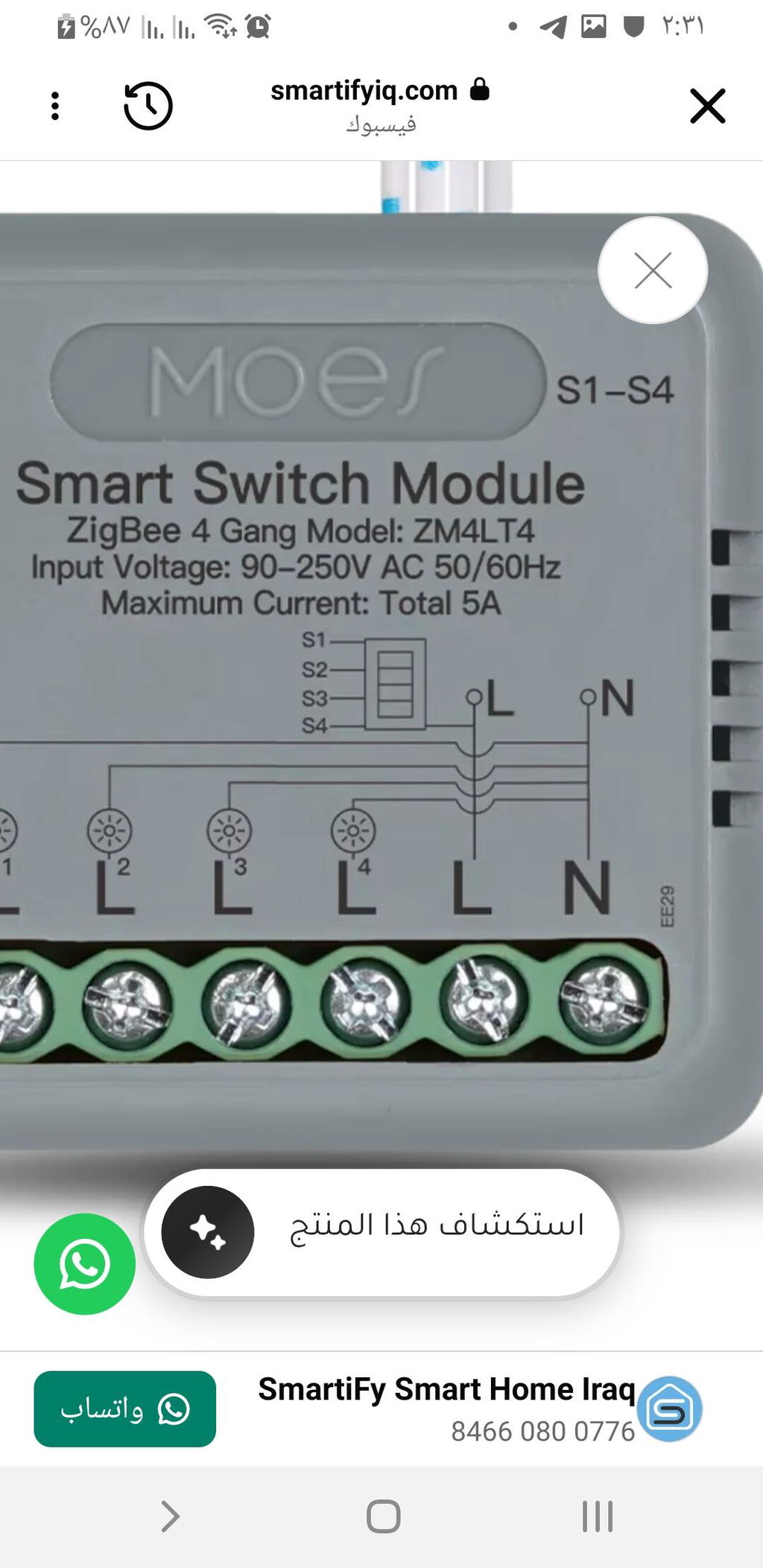
Use the app linked to the gateway or a compatible wall switch. The manufacturer shows wiring for conventional switches and control from more than one location; the three- and four-output versions have dedicated wall-switch input wires that differ from the one- and two-output versions.

Daily lighting schedules

After setting up the gateway and module, set lighting on and off times in the app to choose when the selected circuit operates.

What you need to operate it

  • A compatible Tuya Zigbee gateway is required and sold separately. The module is added to the gateway’s network and app; it does not connect directly to a Wi-Fi router.
  • A live L wire, neutral N wire and 90–250 V AC, 50/60 Hz power supply, with suitable space inside the junction box.
  • A qualified electrician to match the model’s diagram and number of outputs and select suitable loads.
  • One- and two-output versions: 10 A per output and 10 A total. Three-output version: 5 A total. Four-output version: 5 A per output and 5 A total; total limits apply to the entire module.

Technical specifications and differences between versions

Specification Value
Brand MOES
One-output version ZM4LT1 | One output
Two-output version ZM4LT2 | Two outputs
Three-output version ZM4LT3 | Three outputs
Four-output version ZM4LT4 | Four outputs
Connectivity Zigbee 3.0
Required hub Compatible Tuya Zigbee hub, sold separately
Power supply 90–250 V AC, 50/60 Hz
Wiring requirements Live L and neutral N
One- and two-output versions: per-output limit 10 A
One- and two-output versions: total limit 10 A for the entire module
Three-output version: total limit 5 A across all three outputs combined
Four-output version: per-output limit 5 A
Four-output version: total limit 5 A across all four outputs combined
Stated body dimensions 40 × 40 × 18 mm
Control type On/off

Light the room at an evening time you choose

When does it run?: At your scheduled lighting-on time, such as 7 p.m.

What happens?: The room’s non-essential lighting output selected in the schedule switches on.

What do you need?

  • A compatible Tuya Zigbee hub and a module paired with it in the app.
  • A schedule created for the required output, with continuous power and the necessary connectivity available.

Usage notes

  • The example requires setup in advance and is not enabled at purchase.
  • Do not assume this module contains a motion sensor, current measurement or automatic protective disconnection.
  • A network or service outage may prevent the schedule from running; do not rely on it for safety or essential lighting.

Usage guidance

Correct installation and electrical isolation

The electrician must switch off the circuit breaker and verify the absence of voltage with a suitable tester before installation, removal or wiring changes; depending on the circuit, more than one breaker may need to be isolated, and an app command does not provide isolation for maintenance. Follow the original diagram and instructions for the version, not wire colours or another version’s diagram, and use a dry location away from water and moisture.
Choose a load within the version’s limits

Do not multiply the total limit by the number of outputs or exceed the limits of the wiring, loads or any other component. The electrician must review the load type and starting current; the stated ratings do not establish that any LED lamp or motor is suitable even at the same rating.

Frequently asked questions

How do I add the module to the app?

Set up the compatible Tuya Zigbee gateway first, then follow the instructions supplied with the module to put the actual model into pairing mode and add it as a sub-device. Do not use the reset-button press count from a different model.

Discover other devices

PST-RQ500A Zigbee Smart Gas Leak Sensor — UK Plug

Wi-Fi Temperature and Humidity Sensor with Screen — PST-WSD400H

Wi-Fi Temperature and Humidity Sensor with Screen — PST-WSD400H

Sale price  18,500 IQD Regular price  24,000 IQD

Wi-Fi Gas Leak Sensor with Colour Screen — PST-GS21

Wi-Fi Gas Leak Sensor with Colour Screen — PST-GS21

Sale price  28,000 IQD Regular price  35,000 IQD

Wi-Fi Natural Gas Leak Sensor with UK Plug — PST-RQ400A